
I’m a landlord and knew I was going to be in the first cohort of those required to use Making Tax Digital software for the 2026-27 year. As someone who doesn’t like a last-minute rush, and enjoys being an early adopter for most things tech, I decided in March 2025 to start looking at software. I asked around, and someone recommended Hammock.
I’d not heard of Hammock, and signed up for their free trial. At the time it was the only show in town for landlords, as it was then the only software specifically designed for landlords that had been recognised by HMRC as MTD-compatible.
In for a penny, in for a pound, after deciding I liked the look of it, I paid for a year’s subscription up front, and signed up to be a guinea pig in the HMRC pilot to road test not only Hammock, but also QuickBooks for my business, The Independent Landlord.
Five quarterly updates later, I thought it was about time I did a proper review of Hammock. I rarely review products and services for landlords, don’t accept advertising and don’t recommend anything lightly.
The very short version is that I like Hammock so much that I wouldn’t even consider switching to another MTD software for my property income. I’ve been courted by most of Hammock’s competitors, but life is too short and the opportunity cost too great to spend time switching to something else, when I’m happy where I am.
The same cannot be said for QuickBooks, which I detest. I’m regretting choosing it for The Independent Landlord, and have been wondering if I should have chosen Xero.
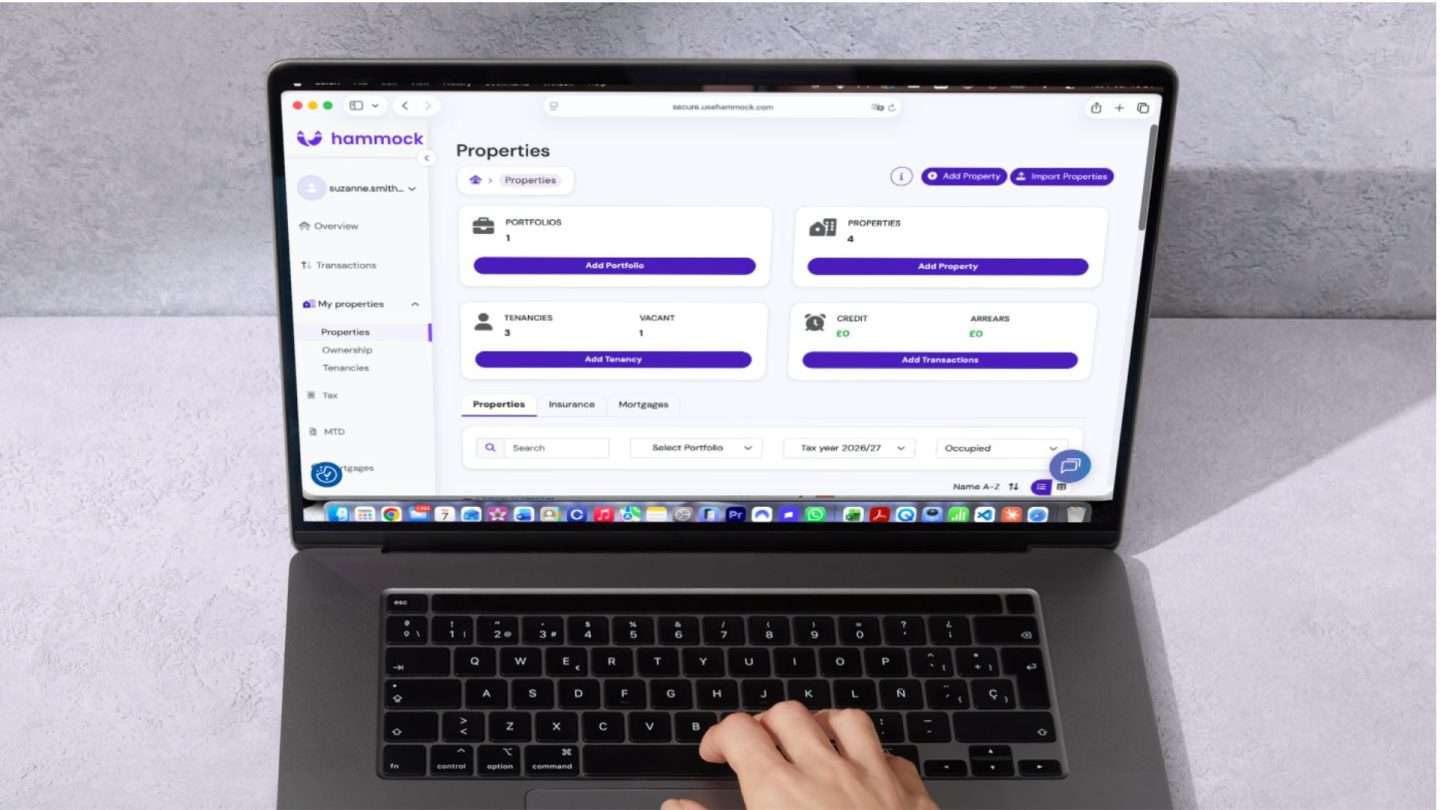
This blog post reviews Hammock, and explains how it works with screenshots of key steps, and why I’m still a fan after my fifth quarterly update to HMRC.
PS If after reading this post you’d like to give Hammock a try, you can get a two-month free trial if you use this affiliate link to sign up.
>> Related Post: Making Tax Digital (MTD) for landlords: How it works
Hammock MTD software for landlords at a glance
- What is Hammock MTD software?
- How does Hammock work?
- My personal experience with Hammock
- Where Hammock could improve
- What about other income and the Final Declaration?
- How much does Hammock cost?
- Help setting up Hammock
- Is Hammock suitable for small portfolios?
- Is it worth paying for MTD software?
- Verdict: Is Hammock any good?
This page contains affiliate links. If you buy something after clicking through, you’ll be supporting this free blog. Thank you!
What is Hammock MTD software?
Hammock is accounting software built specifically for landlords, and was the first accounting software for landlords to be recognised by HMRC as MTD-compatible in 2024.
As well as running in a browser, there are apps for iPhone and Android which make it easy to upload receipts by a mobile phone. Personally, I tend to use my laptop as most of my receipts are emailed to me.
Hammock’s software connects to bank accounts through open banking and automatically reconciles rent against the right property and tenancy. Landlords can allocate expenses against either the portfolio or individual properties.
Every reconciled transaction feeds a running property tax statement, mapped against the SA105 categories HMRC uses for income from property. As well as handling the MTD quarterly updates to HMRC, there is a dashboard for landlords to check occupancy, arrears, gross yields, loan-to-value, and profit and loss by property.
Hammock have told me that over 2,000 accountants use or recommend Hammock, with 65 of the Top 100 accounting firms using Hammock for their landlords.
They have partnerships and integrations with leading accounting software providers, such as Sage, Intuit QuickBooks and Xero, and are the only landlord accounting platform to be recommended by QuickBooks and Sage.
Hammock Financial Services Ltd was founded in 2019 by Manoj Varsani MBE, a former banking CTO and landlord who wanted to get his own portfolio off spreadsheets.
Hammock is registered with the Financial Conduct Authority for the provision of account information services.
How does Hammock work?

Here is an overview of how Hammock’s MTD software works, and what you need to do to set it up:
- Sign up for a free trial (this affiliate link gives you two months’ free trial).
- Set up your portfolio(s)
- Find the “My Properties” tab in the left hand column, click on “Properties”, and then add a portfolio, choosing between “personal” which you hold in your own name or “business” which is owned by a limited company.
- If the property is owned jointly, you can add the beneficial owners and the percentages.
- There is a limited company reporting “add on” option for an additional subscription. Note that this is not part of MTD, but is for corporation tax.
- Add properties and tenancies
- Add properties and tenancies to each portfolio into the software.
- There are options for HMOs and Furnished Holiday Lets (FHL).
- Connect your bank feed(s)
- This is a simple task and the software talks you through it. It is “read-only”, so Hammock cannot make payments on your behalf.
- You can add more than one bank feed.
- You will need to re-authorise the bank feed every three months (this is the same for other software).
- Link Hammock to HMRC – first sign up for MTD for Income Tax through GOV.UK and then authorise Hammock to connect to HMRC (see video here).
- Track rental income
- Set up tracking for your rent payments – you can do it if you collect rent yourself or via letting agents on a tenancy by tenancy basis.
- Once this is done, the software will allocate the rent to the relevant property and the tenancy.
- Expenses
- Expenses are pulled through by the bank feed, and you allocate them to either the portfolio or an individual property. The software gives you various landlord-specific categories to tag the expenditure, for instance Maintenance, which includes materials, repairs, replacement of items and gas safety certificates.
- This makes it very easy, and ensures that the expenses are allocated to the correct categories for the UK property sections of the tax return (called SA105), for instance “Box 25 Property repairs and maintenance” or “Box 36 Costs of replacing domestic items”.
- I upload invoices and receipts as I go along to make it easier if there’s a query. These stay in the platform and are not sent to HMRC. By doing it as I go along, it means it’s quick to submit the quarterly updates.
- You can set up rules to allocate expenses automatically if they are recurring.
- You can add expenses manually if you use a card or an account that isn’t connected via the bank feed.
- It’s possible to exclude expenses if you have personal expenditure coming through on the bank feed.
- Submit quarterly update
- Once everything has been allocated, the software does the rest: no more spreadsheets or emailing things to your accountant.
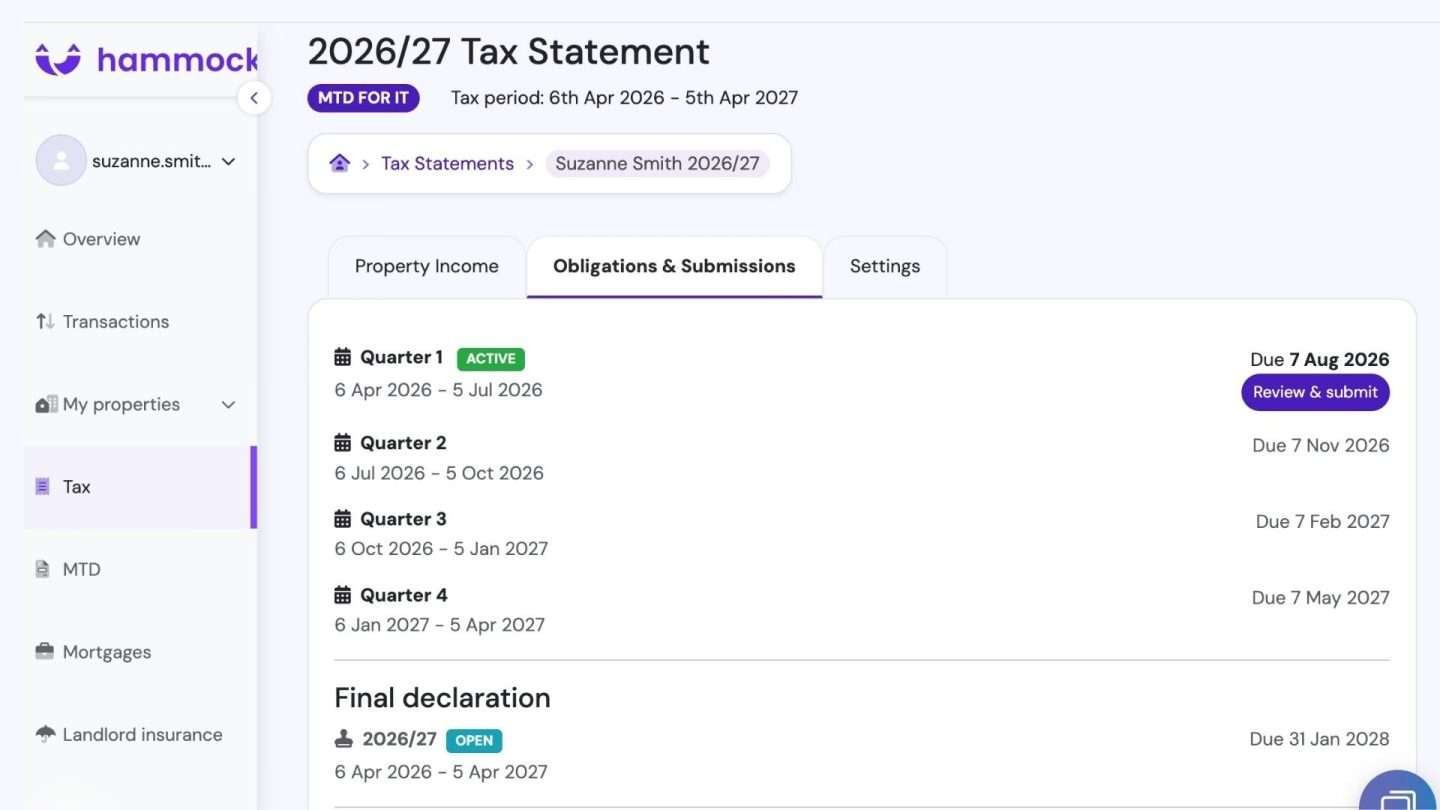
- At the end of each quarter, check everything in Hammock: click on Tax on the left hand side, and go to Tax Statements >> View Details >> Obligations >> See All >> Review and Submit.
- Click the button to submit the quarterly update.
My personal experience with Hammock
I was an early adopter, signing up to Hammock in March 2025, and since then I have submitted five quarterly updates to HMRC.
I have found Hammock to be very intuitive to use, once I’d set it up. They have put a lot of effort into step-by-step videos for those who like to have guidance.
With QuickBooks, you can set up your own categories of expenditure, but Hammock have decided not to do that. Instead it’s a question of finding the correct category to feed into the boxes on the UK Property SA105 page to keep us on the straight and narrow.
It took me a little while to figure out where I needed to allocate things. For instance, if I buy a tube of sealant and other similar supplies, it goes under “Maintenance > Materials”. A replacement fridge is “Maintenance > Replacement of Items”. Capital Expenditure is under Money, and Deposit Return and Deposit Transfer to DPS are under “Other Expenses”.
There is a search function for the categories.
Now I’ve got the hang of it, I find it very quick to allocate everything to its correct home. Each expense takes a couple of clicks, and then it’s done. I always add the receipts and invoices as I go.
I like the dashboard, which shows at a glance how the portfolio and individual properties are faring, showing whether they are occupied, the rent, income for the tax year to date, expenses to date, profit to date and arrears.
There is the option of adding reminders and safety certificates, but I haven’t bothered with that. I have reminders already in my electronic calendar.
I like the fact there’s very little to-ing and fro-ing with my accountant. As I upload invoices and receipts, if they have a query, they can find the answer without asking me.
I do not miss spreadsheets.
Where Hammock could improve
Hammock isn’t perfect, and here are a couple of niggles I’ve encountered with the software.
No mileage function
Although there is a category for Business Travel under Other Expenses, there isn’t a specific set up for mileage, like there is in QuickBooks where you set up a vehicle once, and then enter the start and end location for each trip. The software calculates the mileage, does the “math” at 55 pence per mile (or whatever it is for your vehicle), and will add it as a business expense if you mark it as business travel.
I’ve been getting round this by adding trips manually via Business Travel, ie x miles at 55 pence per mile with the reason for the trip, but it’s a bit clunky.
Hammock have told me that they plan to launch the functionality for mileage in August 2026.
The categories can take a bit of finding
Everything is there, but it can take a bit of finding and getting used to.
For instance, if you buy something that isn’t a replacement (for instance, you put in an additional radiator or buy a fridge for a tenant), that has to go under Capital Expenditure, which is under Money, and not Maintenance, where Replacement of Items is. I then found it confusing that a replacement fridge is under Maintenance. There’s an option for “Home Improvements”, but I’m not sure what that is, as opposed to repairs.
When you want to add a transaction, the default is income, even though I have many more expenses than income to add, because all the rents are tracked automatically.
What about other income and the Final Declaration?
Landlords in scope for MTD need to send a Final Declaration that includes other taxable income by 31 January of each year. The government website explains that they will need to do this through their MTD software and will no longer be able to do it through HMRC’s online filing service.
Hammock have told me it will be possible to include non-MTD matters (eg PAYE, dividends, pension contributions, interest payments etc) in Final Declarations from January 2027.
How much does Hammock cost?
Given the amount of functionality, the amount of time it saves, and the fact that there is less work for the accountant once it’s set up properly, the cost of Hammock is negligible.
The cost differs according to the size of portfolio. Here is Hammock’s annualised pricing as of 8 July 2026 (check here for the latest):
- 1-3 properties: £94.56 inc VAT per annum
- 4-10 properties: £172.80 inc VAT per annum
- 11-20 properties: £288 inc VAT per annum
- 21+ properties: Price on application
- Limited company reporting add on: £172.80
Help setting up Hammock
Hammock run free live tutorials on Zoom two or three times a week to help landlords set up Hammock, or get a refresher. You can sign up for these sessions here.
They also have on-demand step-by-step videos if you’d rather crack on yourself.
Additionally, Hammock offer the following paid onboarding options:
- Starter onboarding. They will set up your ownership structures, add your properties, create your tenancies (£75 + VAT).
- Full onboarding. Everything included in Starter onboarding, plus a private 1:1 onboarding session with the Hammock team. They give guidance on managing historical transactions and assist with the creation of tax statements (£150 + VAT).
Is Hammock suitable for small portfolios?
Absolutely. I have a small portfolio of 4 properties, and it was always a hassle keeping spreadsheets up to date and manually entering transactions. Hammock has taken away 90% of the hassle.
Whether you have 1 property or 21, the bank feed does the heavy lifting by recording each transaction. All you need to do is click on the category for each expense, allocate it to property or portfolio and add a receipt and/or a note to remind you what it is, both of which are optional.
The rent is allocated automatically, which saves time.
Is it worth paying for MTD software?
Yes. There is an adage that if something is free, you are the product. There are many free or freemium products around, but the way they make money is by trying to sell you something. I personally hate being pitched when I am trying to go about my business.
Hammock is not like that. The product is the software, not you. Hammock make their money from the subscriptions, and not by the software acting as a sales funnel to other products.
There is an option to upload landlord insurance details to obtain quotes from Simply Business, but I stay well away from that as I already get my landlord insurance from Alan Boswell. I don’t upload details of my insurance, as that’s not needed for MTD. I get reminders each year from my insurer in any event. (I sometimes get a second quote myself from another insurer).
Also, the cost of the software is tiny. It’s a tax-deductible expense and saves me money, because there is less for my accountant to do. It also frees up my time, and that has an opportunity cost.
Being a landlord is a business, regardless of the size of the portfolio, and having decent accounting software makes running that business easier.
If you’re not sure, don’t forget this affiliate link gives you a free trial of two months.
Verdict: Is Hammock any good?
I have been using Hammock since March 2025 and think it is excellent. It is fairly intuitive to use, and saves me both time and money, removing that “I must do my spreadsheets for the accountant” dread.
Instead, I keep up to date with a few clicks each month, and spend my time on better things.
I am reassured that Hammock originally designed this as a product for accountants, and it has been used extensively by accountants. It was originally recognised by HMRC as being MTD-compatible in 2024, and isn’t a “Johnny come lately” MTD bolt-on to an existing property management “solution”.
It’s also not trying to sell me anything (apart from the landlord insurance, which is easily dodged).
There may well be other excellent MTD products out there for landlords, but as I’m happy with Hammock, I’ve decided not to road test other products.
For landlords who are attached to their spreadsheets, there is bridging software to connect them to HMRC, but that’s not for me. Good luck with that.
Of course MTD is just one of the many new things for landlords. To get the overview of how we need to be running our businesses now, check out my bestselling book The Good Landlord Handbook on Amazon*. It goes through each stage of the tenancy in compliance with the Renters’ Rights Act. It also has a chapter on the business of being a landlord, and mentions Making Tax Digital.
*I’m an Amazon Associate, and I earn from qualifying purchases

Is Hammock going to be able to accommodate claims for tax relief on EIS, SEIS and VCT reliefs in the Final Declaration?
I understand that they will be able to do all of that, but best ask them direct.
The 2025/26 submission did not include “Replacement Items”, replacement white goods in the subtotals. These are not categories in the HMRC form but are included in the next page of the HMRC submission. The only way I found this was a discrepancy between the allowable expenses and the total of all the subtotal expenses which happened to add up to the Replacement Items total. I hope they can sort this out before next April.
I’ve been using Hammock since November 2025 and would echo Suzanne’s positive comments. I have added my 6 properties to the software and it was easy and intuitive to do, each one took about half an hour. I’m now using it as my main accounting software and have already submitted quarterly accounts to HMRC without the need for an accountant.
If you get stuck, Hammock has a helpful A.I. bot that can answer most questions or point you in the right direction. If the bot is unable to answer your query then I’ve found that a human being will send you an email asking if they can help.
I’ve also attended their live training sessions and they’re very helpful, particularly when getting started.
For landlords with a small portfolio who need to file quarterly updates to HMRC then I think Hammock is well worth the cost.
Is there an option for read only for accountant access, or a audit trail so that I know if someone has altered something?
I would like to know whether I have made errors that the accountant has corrected, or whether they have moved things around by mistake etc.
I cannot see this facility, but it would give me reassurance that what I submit is in fact what goes forward to HMRC.
Many thanks
You should ask the software company to answer this technical question.